Sabtu, 24 Oktober 2009
How to Run Warcraft 3 in Multiple Window
You might try to run 2 or Warcraft 3 games at once, but it will fail with error: "Warcraft III Expansion: Frozen Throne is already running".
TFTLaunch allows You to run multi Warcraft 3 games. To use TFTLaunch just download it and copy it to Warcraft III directory.
Download Here

Play Warcraft 3 without Cedega on Linux
If You are Ubuntu/Linux user and You want to play Warcraft 3 and You don't want to pay ~15$ for Cedega (it is tool for running games in Linux) use this guide. It isn't that hard as people say :)

- Step 1. Installing Wine
First You need to install Wine,...
If You are usnig Ubuntu go to Ternimal and type: (for other distribution read here)
sudo apt-get install wine
or You can use Add/Remmove or Synaptic Package Manager.
- Step 2. Installing Warcraft 3
Now insert Warcraft 3 RoC cd in CD-Rom
Then start Install.exe (right click > Open With Wine Widndows Program Loader)
Installation is normal as in windows, if You wanna change installation patch don't us to other partition don't use "D:/Games/Warcraft III" that don't work in Linux.
Use browse and select it manual, partitions are in
/media
for example I installed Warcraft III in my "D:" partition and installation patch looks like this:
/media/sdb1/Games/Warcraft III
Then after installing WC3 RoC install WC3 TFT
- Step 3. Creating Launcher
Warcraft 3 shortcut will be on desktop but don't use that shortcut because it will run Warcraft in DirectX mode and it don't works soo good with DirectX mode.
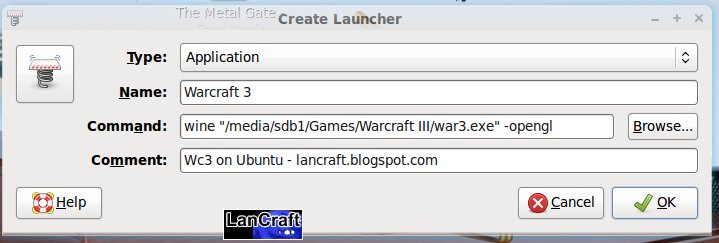
Right click on desktop > Create Launcher... > and then fill
Type: Application
Name: Warcraft III (or something else, it is just a name :))
Command: wine "/GAME PATCH/war3.exe" -opengl replace GAME PATCH with game pacth, if you didn't change it use: /home/USER/.wine/dosdevices/c:/Program Files/Warcraft III/
- Step 3. Installing Patches
For patches just download them and start them (right click > open with wine wine windows program loader)
Before Running Warcraft!
Warcraft movies will not play, because of that go to Warcraft III folder and rename folder Movies to something like Moviesxxx or similar.
- Troubleshoots
1. If game looks something like this:
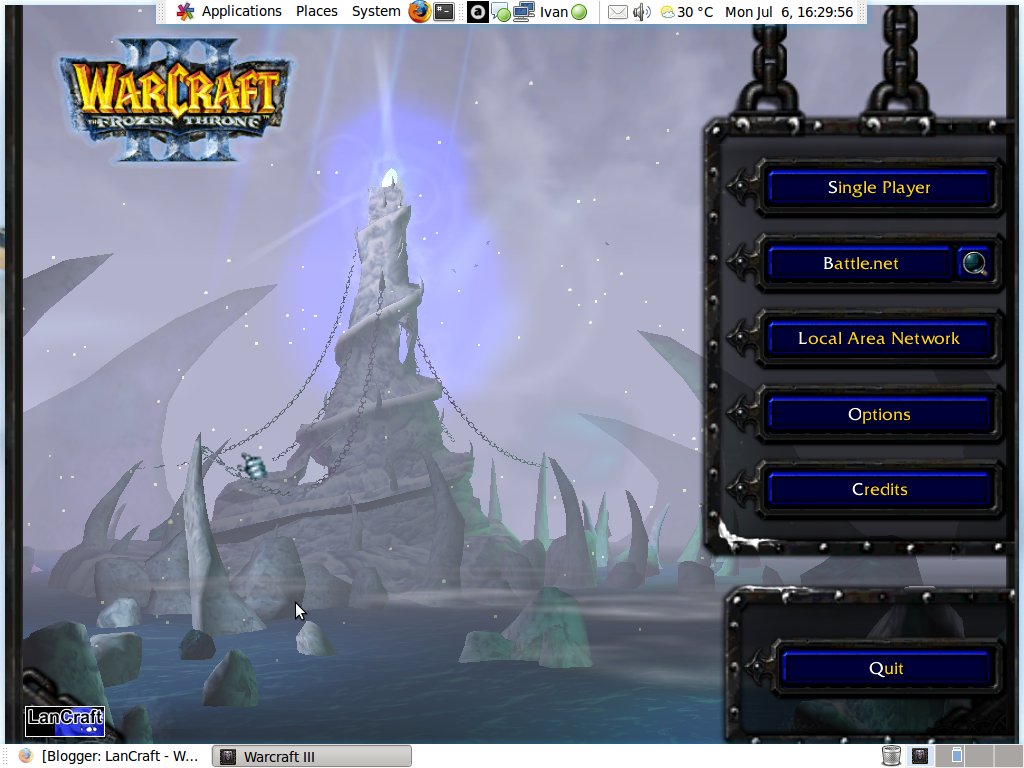
then go to Applications > Wine > Configure Wine > Graphics > Check "Emulate a Virtual Desktop" and set resolution to resolution in Warcraft 3.
Or try to change game resolution.
2. If game runs slow change Video Options to low. Read More..
Tutorial to play Warcraft 3 on Linux Part 1

If You are Linux user and You are using any lan emulator to play Warcraft 3 You need to know that Wc3 lan emulators works on Linux.
You only need to download Wine.
To do that go to WineHQ download page and select Your Linux distro, or if You are using Ubuntu go to terminal and type:
sudo apt-get wineThen download Lancraft, YAWLE or Battle.Lan and run them by right click and "Open with "Wine Windows Program Loader"" after that all is same like on windows.
Here are guides for Lan Emulators:
Lancraft
Battle.Lan
YAWLE
Firewall Guide (port 6112)
Only one thing, don't use button on Lancraft on YAWLE to start Warcraft because it will start in DirectX mode and then game will run slow. Read More..
Kamis, 03 September 2009
Warcraft Version Switcher Download and Guide (Patch 1.24, 1.24b)
The Warcraft Version Switcher software allow you to switch between 2 or more versions of Warcraft 3 TFT on a single PC. This awesome tools is created by Ugge and updated by Aeyah. The latest Warcraft Version Switcher allow you to switch between your current patch into 1.23 or 1.24 patch.
Download Link
Warcraft 1.24 Version Switcher
Rapidshare Link
MegaUpload Link
Warcraft 1.24b Version Switcher
Warcraft 1.24b Version Switcher
Warcraft Version Switcher Guide
1. Extract the zip file from above link.
2. Check the extracted folder and open "Wvs.exe"
3. A warning message will come out, click ok. 4. Set your Warcraft 3 Folder.
5. The application will be closed. Open "Wvs.exe" again. 6. Click Switch Version Button (first button).
7. Double Click the Warcraft 3 version you want to switch.
8. The Warcraft 3 version will be switched.
Enjoy!
Tambahan!!
Download link:
Dota-Patcher Download (17.7 Mb)
Kamis, 09 Juli 2009
MapHack Update 100% Work
DL dsini
or sekalian yg ada spoofernya .
gw saranin jgn msuk ke room official .
cara pkai'a mudah . > login warcraft , masuk ke channel apapun . alt tab ke cheat , tulis nick yg anda mau . pilih warna'a . klik spoof .
DL dsini
CEngine Maphack 1.0
MapHack Undetectable na Battle.Net para o patch 1.23, produzido pelo skillhackers.com, este é o MapHack mais usado atualmente na Battle.Net
Recursos:
*Maphack
*Reveal invisibles
*Show enemy ping signals
*Colouring enemy & fogged hp-bars
*Show ressources
*Safeclick
*Show skills
*Reveal illusions
*Reveal enemy building queues/timers
*Neutral & Enemy unit hotkeys
*Auto-share
*Auto-mining & worker queue
*Obshack
*Coloured creepnames reveal itemdrops
*DotA -ah bypass
*Use different keysets (-roc NEWKEY and -tft NEWKEY)
*Select windowtitle (-title NEWTITLE)
*Multiple start of Warcraft III
DL dsini
smua maphack ini udah -kill ah .
-ah udah ga mempan sama maphack ini . jadi klo dibilang maphack . lu alibi aja . kan tadi udah -ah . yah tapi pinter-pinternya lu main aja.
HanEClub.blogspot.com
Kamis, 25 Juni 2009
Map Hack patch 1.23

Hmp..
Kali ini saya akan memberikan MH patch 1.23 buat kalian.. cara menggunakannya sama kayak MH patch 1.22 cuman ada beberapa perbedan sedikit di MH 1.23 MH ini sudah saya coba di garena en work 100% untuk patch 1.23 so tungguin ajah di server indo patch 1.23.. kalo dah patch cobain perbedaan MH patch 1.22 sama MH patch 1.23
Sabtu, 13 Juni 2009
Map Dota All-star 6.60
DotA All-stars 6.60 HACKED
Commands:
-1337(space)(space) (activates cheats)
-gold #
-lumber #
-int #
-agi #
-str #
-lvl #
-xp #
-hp #
-mp #
-ms #
-debuff (Removes buff from selected unit)
-lock (locks trade sistem)
-unlock (Unlocks it)
-charges# ### (First # slot 2nd charges)
-additem # (max is about 90)
-invul
-vul
-kill
-mana (Mana stays at 100%)
-invis (makes unit invisible)
-vis (visible)
-pathoff (walkthrough walls)
-pathon (normal)
-setcolor (red/blue/teal/purple/yellow/orange/green/pink/gray/lb/dg/brown)
-owner (red/blue/teal/purple/yellow/orange/green/pink/gray/lb/dg/brown)
-nocd (no cooldown)
-cdon (cooldown on)
-bindup/down/left/right (IE: -bindup -kill would make it so that when you hit up it kills whatever s selected)
-clearkeys (Clears bindings)
-showkeys (Shows bindings)
-mh (Dispalys map, no server splits, hopefully)
-setname
-size #
-food #
-heal
-copy #
-fast (Hit esc when training units)
-bfast (Hit esc on building structure)
-ufast (Research is instant)(To disable one of these commands add -no to it like -noufast)
-shareall
-share ##
-unshare ##
-ally ##
-unally ##
-soff (share off)
-spawn #### (List)
-ground ####
-add ####
-remove #### (removes the ability)
-g ## #### (gold)
-l ## #### (lumber)
-f ## #### (food)
-spa ## #### (Spawn unit)
-sn ## (setname)
-sc ## (red/blue/teal/purple/yellow/orange/green/pink/gray/lb/dg/brown)
-dead (Sets units animation to dead)
-birth (Sets building to being built)
-attack (Sets unit to attack)
-stand (Sets unit to stand)
-hear (You can see what everyone is saying)
-nohear (back to normal)
-noreplay
-kick ##
-tele (sets patrol to teleport)
-note (sets it back to normal)
-reg (Right-click two spots and a region will be made)
-time ## (Sets time to that hour)
-float ### ### (first #'s is height 2nd are speed)
-stop (Disable unit commands)
-resume (Enables them)
-area #### #### (First #'s are size 2nd Rawcode, then click where you want it)
-autoh ### (Autoheals by precentage)(A little buggy)
-disable (Disable -reg)
-list# (1-8 )
-cheaton ## (Turns cheats on for player specified)
-cheatoff ## (Turns cheats off for player specified)
-unit #### (Spawns specified unit at issued location)
-nounit (Disables -unit)
-act (Changes activator to whatever specifed, needs a - at the beginning)
-unitid (Shows the unit's rawcode)
-itemid (Shows the unit's item rawcode in first slot)
-destid (Shows rawcode of destructable in Reg)
-destroy (Removes selected units)
-revive (Revives dead hero and spawns at selected unit)
-addhp (Adds hp to any unit, needs to be divisable by 50)
-colors (Displays player numbers by color)
-say###### (# = hex code only 0-9 and A-F will work)(After the hex just put the text you want displayed)